Deployment
If you already have a hosting provider, you only need to serve the files generated by mspa build.
If not, this page contains options that are officially supported.
GitHub Pages
All new projects come with the .github/pages.yml Github Actions workflow.
It will automatically deploy your website every time relevant commits are pushed.
First, go to your repository’s settings and choose Github Actions as source in the Pages section:
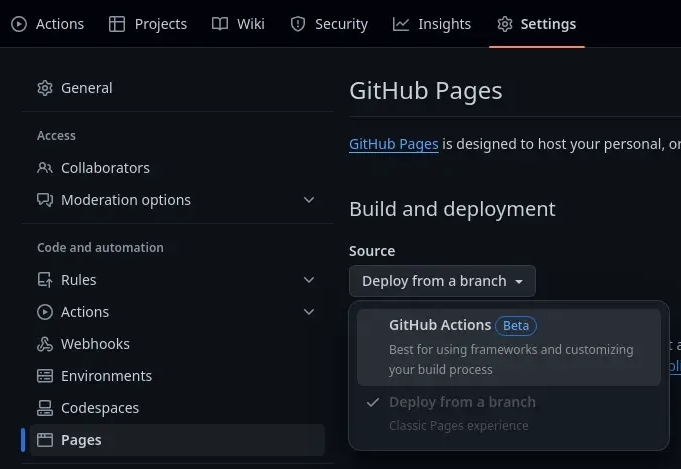
Then, set prod_url to your website’s root URL in config.ini:
"prod_url": "https://<user>.github.io/<repo_name>"
Make sure path (pages.yml) matches your configured build_path (config.json):
- name: 📤 Upload artifact
  uses: actions/upload-pages-artifact@v2
  with:
    path: './generated'
Codeberg Pages
There are two approaches to host MarkdownSPA projects on Codeberg:
- If you already have a Codeberg repo, you can create a branch named
pages; - Otherwise, all the files can be stored in the default branch of the Codeberg repo.
In both cases, all the source files should be stored in a hidden directory:
# Switch to pages branch, only if you want a website along side your project
git checkout -m pages

# Create the MarkdownSPA project in a "hidden" directory
mspa init .docs
Then modify/create config.ini with the following build path and your website’s root URL:
"build_path": "..",
"prod_url": "https://<user>.codeberg.page/<repo_name>"
With this build path, all files will be generated at the root of the branch/repo, essential since the website’s root directory is the branch/repo’s root.
To avoid 404 errors, make sure to make a production build before pushing your changes:
mspa build --prod .docs.
As mentionned here, the future of Codeberg Page is unsure and high availability can’t be guaranteed.